


Topic - How to take screenshot in pc & laptop?
We all love taking screenshots in mobile today in this modern age. Screenshot has become a different and useful type of capturing photographs on the mobile screen today. But why shall we still capture screenshots only in the mobile. While it is also available in pc and laptop also. Today I shall teach you how to take screenshot in pc & laptop in a very simple way . Yes, there are many ways to take screenshots in pc or laptops. But, I will teach you the most easiest method of taking screenshots. Yes, it is the most easiest method of taking screenshots by only using " Microsoft Paint " app. Can you recognize the paint app which we used to paint in the computer screen in our childhood ?
You have to perform these following steps below -
1. At first, you have to select a computer screen of which you want to take screenshot and then open the computer screen. You are looking I have already selected a screen below of which I will take screenshot.

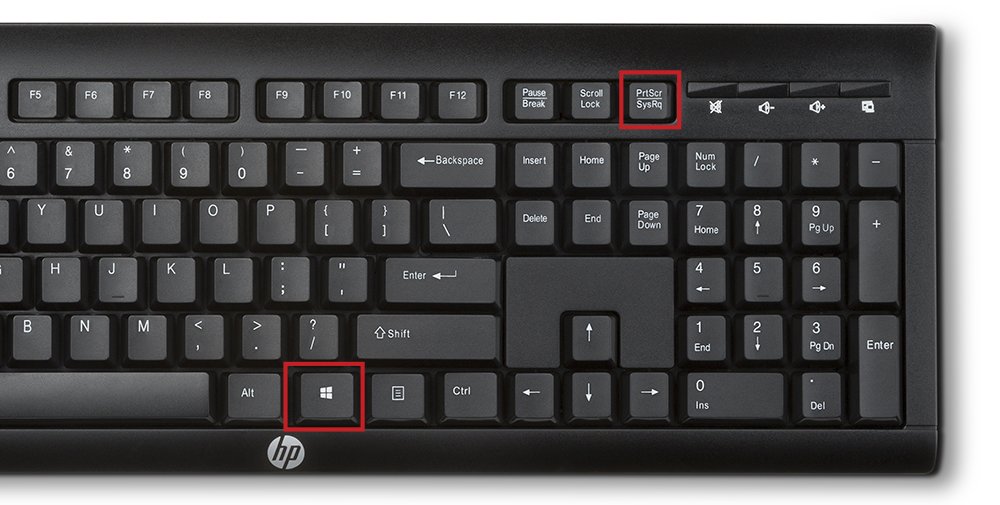
2. You have to now type the " prt sc " key on your laptop keyboard or the "PrintScreenSysRq" key on your pc keyboard. That will take screenshot of your computer screen or you can simply say that you have copied your computer screen successfully. In the next steps, we shall learn how to save the screenshot in your computer storage.

Keywords:
How to screenshot on Windows laptop,How to screenshot on Windows 10,How to take screenshot in laptop Windows 7,how to take a screenshot on windows 8
